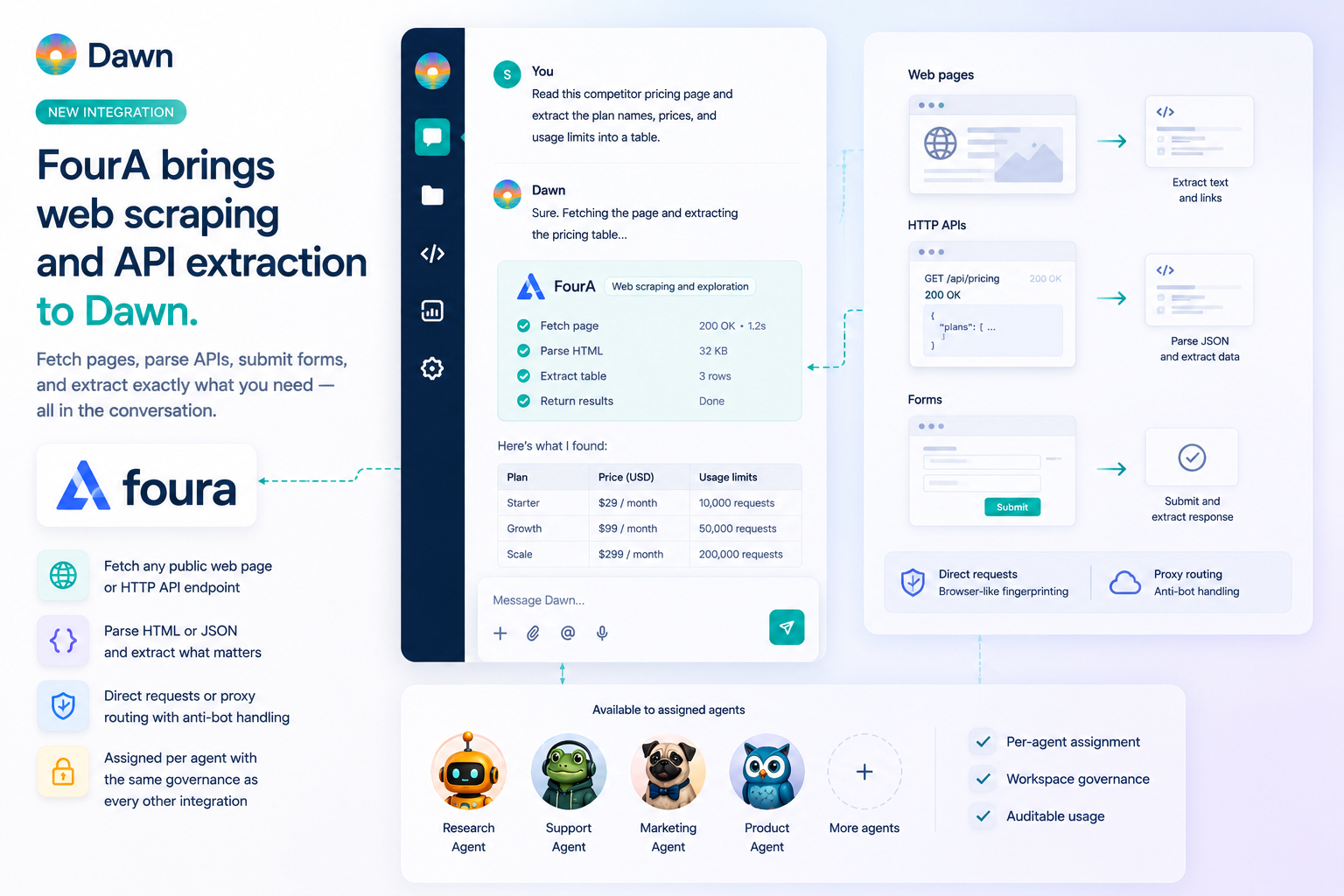
Dawn now ships a first-party integration with FourA. Workspace owners and managers can connect FourA from Dawn Web with an API key, link the Web scraping and exploration source, and assign it to the agents that should have it. Once assigned, the agent can fetch a public web page or HTTP endpoint, parse the response (including JSON), submit a form, check reachability with a HEAD request, and pull specific text or links out of what comes back — all from the same conversation where the rest of the work is happening.
This is a different job from web search. Dawn already has /web-research for the broad case — find relevant sources across the web and synthesise an answer. FourA is for what comes after, or for tasks that never needed search in the first place: the agent has a specific URL or HTTP endpoint, and the useful next step is to scrape the page or hit the API, pull out the structured content the task needs, and use it in the conversation. Like the SendGrid and MailJet integrations, FourA is curated rather than generic — the API key handling, proxy routing, and request shapes deserve real handling instead of being shoehorned through a one-size-fits-all adapter.
Search Finds the Page. FourA Scrapes It.
/web-research is for the case where the question is broad. Find the right sources, evaluate them, return a focused answer. That covers a lot of useful work, but it stops at the point of “here is the page, here is the gist”. Sometimes the gist is the answer. Sometimes it is not — sometimes the agent needs to actually fetch the page, parse what is on it, and pull out the structured content the task depends on.
That is the work FourA does. A competitor updates a pricing page and you want a side-by-side comparison against your current plans, with the actual numbers extracted into a table. A vendor changes a public API response shape and your docs page is six months behind, so the agent needs to fetch the live response and surface the diff. A customer pastes a help article URL into the channel and asks what it means for them — the agent scrapes the page, summarises it for that customer’s context, and drafts a reply. Each of these starts with a specific URL or endpoint, and the useful step is fetch-parse-extract, not search.
A few asks that show the shape:
Read this competitor pricing page and compare the plan names, entry prices, and usage limits with our current plans.
Open this public API endpoint, parse the JSON, and explain which fields changed since the sample in our docs.
Inspect these three vendor docs pages and tell me which one explains SSO setup most clearly.
The user stays in the conversation. The agent uses the FourA capability assigned to it, brings back the relevant result, and explains what it found. None of this needed a separate scraping tool open in another window.
One Source, Assigned Per Agent
FourA follows the normal Dawn integration model. The workspace owner connects the provider account once with a FourA API key. Dawn exposes a single source called Web scraping and exploration, and that source is assigned to the agent profiles that need it.
There is no scrape-project builder in this release and no per-site setup step. Assignment is binary: an agent either has access to the capability or it does not. A research agent might have it. A planning agent might not. A customer-support agent might have it for inspecting customer-shared URLs but operate against the same workspace policy as every other agent.
Under the hood, Dawn exposes a small toolkit on top of FourA. The agent can fetch a page, fetch a JSON endpoint, submit a form, check reachability with a HEAD request, and pull specific text or links out of a response. Each request runs in one of two modes: a direct request with browser-like fingerprinting (so the request looks the way a normal browser request would), or a proxy-routed request with anti-bot handling for cases where the direct path would be blocked or rate-limited. The agent picks the right shape for the task. Custom headers, request bodies, redirects, and optional JSON parsing are all part of the same surface.
Most users should not have to think about which mode is in play. The practical version is “if the agent has FourA assigned, it can fetch the URL or endpoint the task needs, parse the response, pull out the parts that matter, and bring them back into the thread.”
Where Page and API Inspection Earns Its Keep
The everyday wins land across several roles:
Product Managers can compare three public docs pages, three pricing pages, or three competitor changelogs in the same thread where the brief is being drafted — without copy-pasting paragraphs between tabs. The agent reads each page, lays out the differences, and the PM keeps the version that matters.
Marketing & Content can inspect competitor landing pages and pricing pages alongside the latest release notes from the connected repo, so the launch positioning gets shaped against current public framing rather than a stale snapshot.
Support Engineers can open the URL a customer just pasted into the thread, summarise what the article says, and tell the customer what it means for their situation — without having to read the full page first.
Solutions & Sales Engineers can pull a competitor’s published feature comparison or a buyer’s public tech blog before the call, with the agent producing the read in seconds rather than the rep doing the homework manually.
DevOps & Platform Engineers can inspect a vendor’s public status page or a public API response when a workflow depends on the external system being healthy and well-behaved.
Technical Writers can compare the agent’s draft against the live page on the docs site, or inspect a third-party reference (MDN, a framework’s own docs) and pull the authoritative wording into the draft.
Pair It With Scheduled Tasks for Monitoring
The most under-rated FourA loop is recurring inspection. A scheduled task that checks a competitor’s pricing page weekly and posts a “what changed” digest in the team channel is now a one-line setup. So is a Monday-morning sweep of three vendor docs pages, or a daily check on a public status page that affects an internal workflow.
The team gets a notification when the public source it cares about meaningfully shifts, instead of finding out three weeks later when somebody asks “wait, did their pricing change?”. And because the agent reads against current state every run, the digest is always grounded in what the page says today, not in a screenshot from last quarter.
Try It
A few asks that pay back on day one:
Open this competitor pricing page and compare it side-by-side with our pricing memory page — flag the plan names, entry prices, and usage limits where we look weaker.
Inspect this vendor status page and tell me what the latest incident is, when it started, and whether it touches the regions our customers run in.
Read the linked MDN article on the View Transitions API and pull the parts our docs migration guide should cite, with quotations.
Open this customer's help article URL, summarise it for our context, and draft a reply that addresses the customer's actual question.
Hit this public JSON endpoint, parse it, and turn the top-level fields into a Markdown table I can paste into our spec doc.
Set up a weekly task: every Monday, check this competitor's changelog page and post a digest of new entries to #competitive.
If the agent has FourA assigned, the work happens in the conversation. If not, Dawn explains what is missing and points at the right owner to ask.
What This Does Not Replace
FourA does not replace Dawn’s native data integrations. If the information lives in GitHub, Jira, Linear, Confluence, Notion, Figma, Framer, Google Drive, OneDrive, MailJet, SendGrid, or another first-party provider integration, use that path. Those integrations understand provider permissions, source linking, and provider-specific data shapes far better than a generic page-inspection layer does.
It also does not turn the public web into a permanent knowledge base. FourA gives agents a way to inspect specific pages and endpoints during a run. If the team wants durable knowledge — the team’s interpretation of what a competitor’s pricing means for our positioning, the canonical version of an external standard, the lesson learned from a vendor outage — that should still live in memory pages, connected sources, or the systems of record themselves.
And it is not a bypass for access boundaries. FourA is for public pages and endpoints where automated access is appropriate. Paywalled content, private systems, or anything that requires credentials the workspace should not be holding is out of scope, and the agent will not pretend otherwise.
Getting Started
Owners and managers can open Dawn Web, go to Integrations, choose FourA, and enter the API key from FourA. After validation, link the Web scraping and exploration source and assign it to the agents that should use it.
The setup guide covers the exact flow:
Once assigned, agents can scrape the URL or endpoint a task needs from the same Dawn conversations where the team already plans, researches, troubleshoots, and writes. Search finds the page. FourA scrapes it.