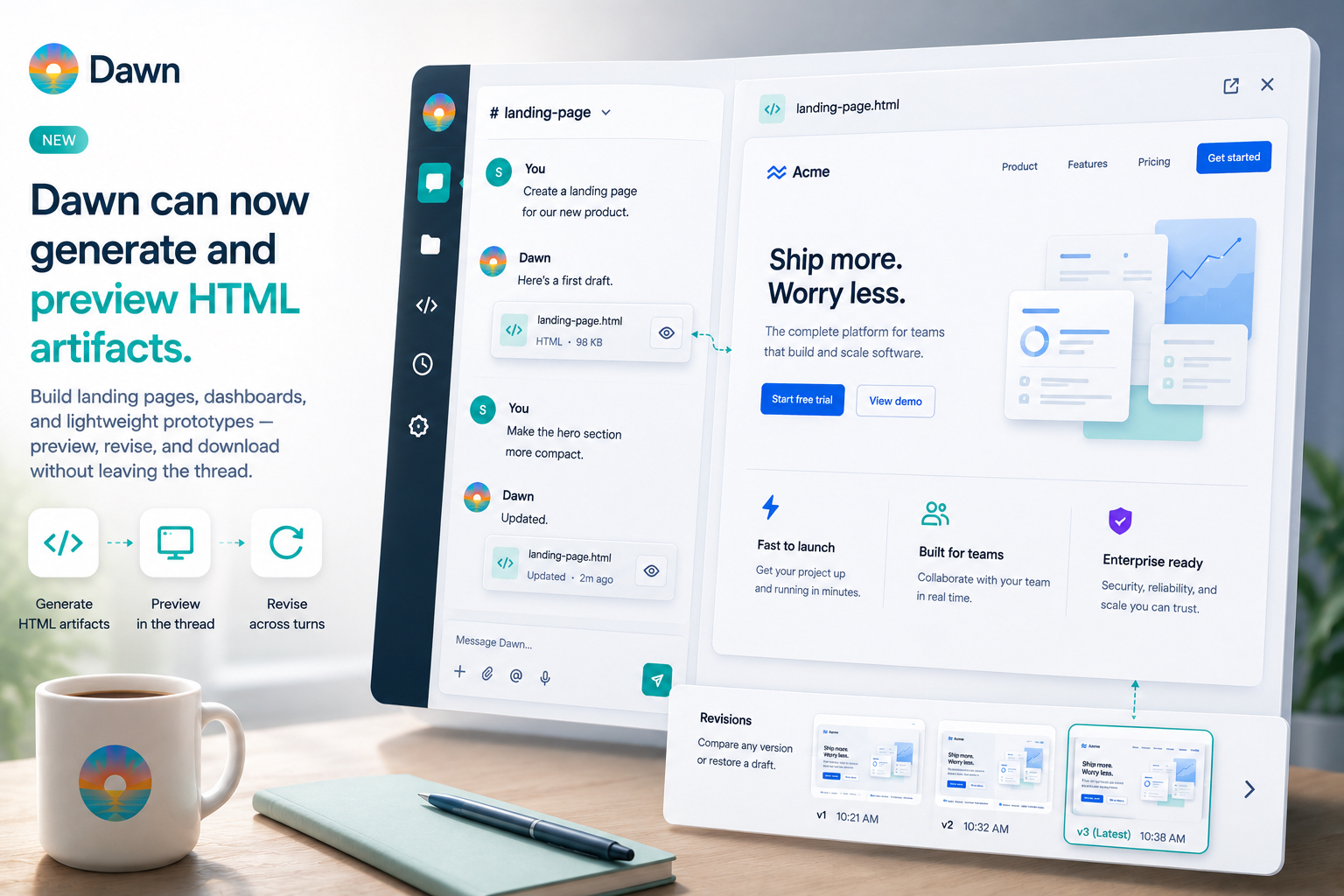
Ask Dawn for a pricing page draft or a quick dashboard mockup and, until this release, the conversation tended to end the same way: a download link. The file was there, but working with it meant leaving the thread — open it in a browser, flick back to Dawn, describe a change, download the next version, repeat.
That loop worked but wasted attention. Visual work is naturally iterative, and the transcript was the wrong place to hide the thing you were iterating on.
This release changes that. Dawn now treats generated HTML as a first-class artifact you can preview next to the conversation, revise in place across several turns, and download when it is ready to share.
Previewing Artifacts Next to the Conversation
When Dawn generates HTML, the thread no longer ends at a file attachment. The result appears as a dedicated artifact card with a preview action. Open it and the rendered HTML slides in beside the chat, so the transcript stays visible while you inspect what Dawn built.
The preview renders the artifact as a real page — layout, spacing, interactions, styling — not a screenshot or a summary of what Dawn produced. You are looking at the thing, which is what matters when the thing is the deliverable.
That side-by-side view is the whole point. You can see the current draft, scroll back through the request that produced it, and ask for the next change without shuffling between windows. Comparing “what I asked for” with “what I got” becomes a glance rather than a context switch.
Inline preview is available today in Dawn Web and Dawn Desktop. When the same thread is read from a chat channel like Slack or Teams, Dawn still returns the HTML as a downloadable file, so the output remains usable wherever the conversation lives.
Prototypes That Land in the Thread
HTML artifacts are most useful for work that sits between “write me a document” and “build me an app.” A product manager wants a rough settings screen to discuss with design. An operations team wants a status board for an incident review next week. A founder wants a landing page mockup that has real structure rather than a paragraph describing one.
Take the incident review as a concrete example. You ask Dawn for a one-page incident dashboard with a summary, a timeline, a list of affected services, and a next-actions section — calm palette, not too dense. Dawn produces a first draft using placeholder content. You open it beside the thread and see that the timeline takes up too much of the page, the services list is buried at the bottom, and the palette is leaning more corporate than calm. You ask for the timeline to shrink to half-width, the services to sit next to it, and a softer colour set. Dawn revises and the preview updates. One more round on spacing and the dashboard is ready to share in tomorrow’s review.
That is the loop the feature is built around: ask, open, point out what is wrong, ask for a revision. The thing you are reviewing is the same thing the team will eventually see, so decisions made against the preview carry through to the final output without a translation step.
Revising the Same Artifact Instead of Starting Over
The second important change is that Dawn understands these outputs as artifacts that evolve, not disposable one-off files. When you have a preview open and ask for changes, Dawn revises the artifact you are already looking at rather than generating a disconnected new one.
Revisions can be as small or as sweeping as the situation calls for. Small visual tweaks — “narrow the sidebar”, “use sentence case in the headings”, “add more whitespace between the cards” — land quickly and leave the rest of the artifact untouched. Layout changes like “switch to three columns”, “move the KPI cards to the top”, or “put the filters in a side panel” rework the structure without losing the content. Tonal shifts are handled the same way: ask for “a darker operations dashboard rather than a marketing page”, or “keep the layout but make this feel like a customer-facing prototype instead of an admin tool”, and Dawn rebuilds the styling in that direction. Even a request like “keep the copy but reimagine the layout from scratch” works — the content stays, the shape changes.
Earlier revisions stay in the thread rather than disappearing. When you want to compare versions, the preview pane can move between them, so a decision like “the second one was closer” does not require digging through a downloads folder.
Part of the Team’s Normal Review Loop
Plenty of tools can emit HTML. What changes here is that the HTML becomes part of the same workflow teams already use Dawn for. Someone asks for a prototype in Dawn Web. A teammate opens the thread later and sees the artifact history alongside the discussion that produced it. A Dawn Desktop user can inspect the same result without switching tools. The conversation and the artifact travel together, which makes the usual questions — who asked for this, what did they actually want, which draft are we looking at — easy to answer by scrolling.
Handoff stays straightforward. The final artifact is still just HTML, so downloading it and attaching it to a Slack thread, pasting a link into a design review, or sending it to a stakeholder for sign-off works exactly as it would for any other file. Dawn is not becoming a hosting surface for prototypes; it is just no longer getting in the way of you getting the prototype out of Dawn and into wherever the rest of the review is happening.
That fit into the normal review-and-iteration loop is what makes these artifacts useful for actual work, not only novelty demos.
Prototypes Shaped by Your Workspace
HTML artifacts get more useful when Dawn is not starting from scratch. Every prototype the agent produces is shaped by the context it already has in the workspace — connected sources, skills, and memory pages — which means the first draft lands closer to your product rather than closer to a generic template.
If the agent is connected to your codebase, it can see how the real product is built. Ask for a new settings page and the prototype can follow the patterns already in the repo: the same layout primitives, the same naming conventions, the same visual hierarchy the frontend team already uses. That matters when the prototype is the starting point for an eventual implementation, because there is less translation between “the mockup” and “the code someone will actually write.” If the connected source is a Confluence space or a Notion page with the PRD, the prototype can be grounded in the requirements that were written down, not a paraphrase of them.
Skills handle the other direction — the parts you want consistent across every prototype regardless of what is in the repo. A workspace skill that describes your design tokens, typography, spacing, and button styles means every artifact the agent produces respects them, not just the ones where someone remembered to include that guidance in the prompt. The same applies to layout conventions: a skill that says “dashboards always lead with the primary KPI, never more than four cards in a row, no more than two colours of emphasis” turns those rules into persistent behaviour rather than a recurring instruction. Once the skill is written, the consistency is automatic.
Memory pages fill the gap between threads. When an earlier conversation produced a dashboard and the team agreed on a cooler palette than the default, a memory page can record that decision — so the next prototype reaches for the cooler palette without needing to be told again. The same mechanism captures the small judgement calls that would otherwise evaporate between conversations: which layout was retired, which colour was rejected, which voice the team settled on for admin copy. A prototype a month from now can still reflect those calls because the agent is reading from the same structured context the team has been maintaining.
None of this replaces telling Dawn what you want. It changes the starting point. The agent already knows something about your product, your conventions, and the decisions you have made along the way — and that shows up in the first draft instead of taking three rounds of revision to appear.
Writing Requests That Produce Good Artifacts
A few small habits make the difference between a first draft that is close to what you wanted and one that needs three rounds of rework.
Describe the shape of the output before you describe its content. “A one-page dashboard with four KPI cards at the top, a main chart below them, and a recent-activity list at the bottom” gives Dawn enough structure to produce something coherent. “A dashboard for sales data” does not, and the first draft will reflect that.
Mention tone and audience if they matter. Phrases like “calm and executive-facing”, “dense and data-rich”, “customer-facing prototype, not an admin tool”, or “internal status board, functional over pretty” steer the styling in a direction that would otherwise be a coin flip.
Skip the technical specifics. You do not need to tell Dawn which CSS framework to use, how to structure the DOM, or what colour variables to define. Describe the thing as you would describe it to a designer who is about to sketch it, and let Dawn handle the markup.
Treat the first draft as a starting point. Even a well-written request will land somewhere you want to adjust, because the feedback loop is most of the value. The faster you move from “first draft” to “open and point out what is wrong”, the less each individual request has to carry.
Lean on what Dawn already knows. If your workspace has a design-system skill, a connected codebase, or memory pages that capture previous design decisions, you do not need to repeat that context in every prompt — the agent will reach for it on its own. Save your instructions for what is specific to this artifact, and let the workspace handle what stays the same across all of them.
What HTML Artifacts Are and Are Not
HTML artifacts are designed for self-contained outputs: mockups, dashboards, small visual reports, and lightweight prototypes. They sit alongside the documents Dawn can already read and generate — each is a different shape of output for a different kind of deliverable, and you pick the one that matches the work.
They are not trying to replace a full multi-file web application workflow. If the deliverable is a production app with multiple routes, external runtime dependencies, or a larger codebase, that is a different kind of problem and not what this feature is aimed at.
The preview is also a place to review, not to edit. You revise the artifact by talking to Dawn, not by editing the HTML directly inside the pane. That narrower scope is deliberate: it keeps the feature fast, predictable, and genuinely useful for the kinds of visual outputs teams ask for most often, rather than stretching it into a half-built in-browser IDE.
Getting Started
The easiest way to use the feature is to ask for something concrete rather than opening a design discussion. Ask Dawn to draft a pricing page, sketch an incident dashboard, mock up a small internal tool, or produce a lightweight prototype for a feature review. Open the result beside the thread, say what to change, and keep iterating until it is ready.
Before this release, that kind of request usually ended with “download this and inspect it somewhere else.” Now the visual result stays where the conversation already lives — which makes Dawn better at one of the most common kinds of team work: turning a rough idea into something people can actually look at, review, and refine together.
HTML artifacts are now durable workspace files alongside everything Dawn produces — see Files, Attachments, and Previews for the broader file-handling update.