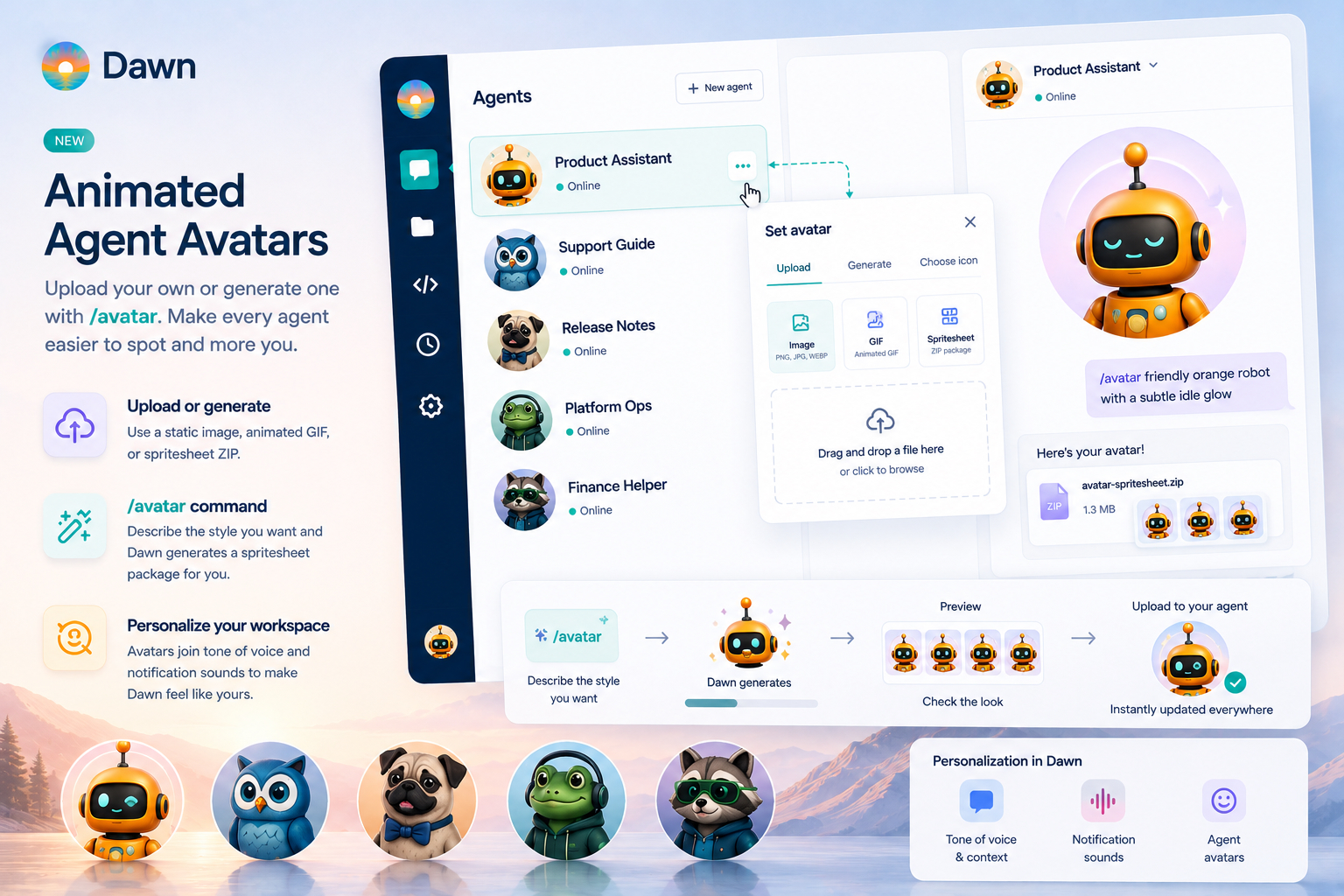
Dawn agents can now have custom avatars, including animated ones. Upload a static image, an animated GIF, or a ZIP spritesheet package - or run the new /avatar slash command and let Dawn generate a spritesheet package for you, ready to upload.
Before today, every Dawn agent in a workspace looked like every other Dawn agent only on a differently coloured background. Functional, professional, and completely interchangeable. After about a week with three agents on screen, even the people who built them start clicking the wrong one. We could not bring ourselves to keep shipping that, so here we are.
This is the third personalization tool we have shipped in Dawn. The first was per-account tone of voice and context - adding a little bit of personality to Dawn’s answers. The second was the short notification sounds in Account Settings - to get your attention when a task is completed or Dawn needs your input. Animated avatars are the third: how each agent looks. None of these change what an agent can do; together they let teams shape the day-to-day feel of working with Dawn.
Set the Avatar From the Agent List
Hover over the agent avatar and click to pick a file. Dawn accepts standard image files for static avatars, animated GIFs for simple motion, and ZIP packages for the spritesheet format. You can also change the agent avatar from the agent’s General settings section when you are already in there for something else.
Generate One With /avatar
The easiest way to get new animated avatar images is the new /avatar slash command. Type it in a Dawn conversation, optionally with a short style brief, and Dawn produces a ZIP package and a preview of the generated avatar.
The brief can be as plain or as silly as you like:
/avatar friendly orange robot with a subtle idle glow
/avatar calm support guide, soft blue background, small blink
/avatar tax compliance owl, small monocle, very slow disapproving blink
/avatar release-note pug in a tiny bow tie, gentle head tilt
Dawn runs the work in the background and returns the upload-ready ZIP and a preview image so you can immediately decide if you like it. You can then upload it to whichever agent you want. (A small mercy for anyone who realises mid-prompt that the next person to open Dawn is going to be the CFO.)
If you would rather just ask and not type a command, the new Avatar Spritesheet skill ships bundled too. Tell the agent something like “create an animated avatar of yourself” or “make me an avatar of a teal owl with a slow blink” and the skill produces the same kind of upload-ready ZIP and a preview image.
Static, GIF, or Spritesheet
For most agents, a normal image is enough. PNG, JPEG, or WebP gives the agent a clean static avatar, and that is often what makes the workspace easier to scan.
Animated GIFs are useful when the animation is already prepared and short. They work well for light motion. They become noisy fast, so a calm short loop almost always wins over a loud long one.
Spritesheet ZIP packages are for avatars that should animate cleanly at the small sizes Dawn uses for headers, agent lists, and thread metadata. The package is one spritesheet image plus a tiny metadata file that tells Dawn how to play the frames. The /avatar command and the Avatar Spritesheet skill both prepare the package the same way: square frames, an opaque background, and subtle motion - a blink, an idle bounce, a soft glow - so the avatar reads at every size.
One quiet rule of thumb: the avatar will be visible for the entire workday, so subtle motion ages better than dramatic motion. The third time you watch a tiny cowboy frog do a backflip in the chat header, you will agree.
Personalization, Not Permissions
Custom avatars do not change what an agent can read or do. Source bindings, skills, channels, and tool permissions all stay exactly where they were.
What does change is the small daily moment when someone opens Dawn and recognises which agent is talking before they read the name. That is a tiny gain on any single message, and a real one across a week of them. A support agent, a release-note agent, a product planning agent, and a platform operations agent should not all look the same. Avatars make the workspace faster to scan and, alongside tone of voice and notification sounds, give teams the levers they need to make Dawn feel like theirs.
Getting Started
Open Dawn Web and go to Agents. Hover over an agent avatar and click the camera icon to upload an image, GIF, or spritesheet ZIP.
To generate one, open a conversation with the agent and run:
/avatar <style you want>
Dawn returns the ZIP and a single preview image. Drop the ZIP into the avatar picker - in the agent list or General settings - and the new look turns up everywhere the agent does: chat headers, the agent list, thread metadata.
If you are about to spend the next twenty minutes naming your finance agent something dignified and then dressing it as a hand-drawn raccoon in a green visor: that is the intended use. We will not judge you, but your team will!
Share your new avatar creations with us on X